|
Click on any product logo for more details!
|

|
|
Get the CAD software that will work with ANY CMC. Use it to create custom mat designs that can span all brands of CMC equipment and software.
Learn More.
|
|

|
|
The award-winning Web browser is better than ever. Faster, safer, and easy to use, Firefox
delivers a better Web experience.
Learn More.
|
|

|
|
Get the acclaimed email client from Mozilla. Import your existing mail and enjoy powerfulspam protection.
Learn More.
|
|

|
|
LibreOffice is a powerful and free office suite, a successor to OpenOffice(.org),
used by millions of people around the world. It includes several applications that
make it the most versatile Free and Open Source office suite on the market:
- Writer (word processing),
- Calc (spreadsheets),
- Impress (presentations),
- Draw (vector graphics and flowcharts),
- Base (databases),
- Math (formula editing).
|
|

|
Use the free Adobe Reader software to view, print, and search Adobe PDF files.
Whether you use it at home or in your business, on your computer or on a mobile
device, upgrading to Adobe Reader helps you work faster and better.
|
|
|

|
|
- FREE PDF Converter - not a trial version.
- Print to PDF from virtually any application.
- Create PDF output optmized for print, screen, ebook, or prepress.
- No annoying pop-up ads, no registration requirement - no catch!
- High-quality, easy to use PDF creator for all users.
- Secure PDFs with 40-/128-bit encryption, allowing the highest level of security for your
PDF files. Settings include password to open, password to change, disable printing,
disable text/graphics copying, disable commenting, disable text editing, disable page
addition.
- Add document information (e.g. title, author, subject, keywords) to converted PDF
files, resulting in faster and easier searching of PDF documents.
|
|

|
|
FREE Shopping Cart Service
Add simple Buy Now buttons to your product pages and your customers can fill
out an order while they browse your website. Configure the cart to collect card
data and save it for processing later or link directly to a number of big name
payment processors.
- Customize the look and feel of your store
- No scripts or applications to install
- Build as large an e-commerce site as you want
- Access to SSL secure server
- Support for more than 20 languages and any currency
- Hook-up directly to PayPal, Verisign, Authorizenet and many, many, more
- Integrate your web sales with: Quickbooks, UPS, USPS
- and more...
|
|

|
|
Do you need to accept Credit Cards?

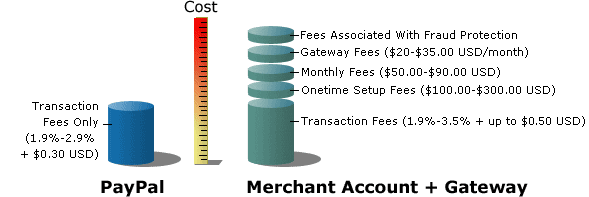
There are no setup fees, monthly fees, or gateway fees and you can get a rate
as low as 1.9% per transaction. Your Customer can use a any major credit card and
you can reach a network of 100 million PayPal account holders in almost every
country and region. Growing by 100,000 accounts per day, these proven active
shoppers transact an average of over $8.1 billion USD through PayPal every quarter.
PayPal is affordable for businesses of all sizes. PayPal can be less expensive
than credit cards accepted through a traditional merchant account.Fees are applied
only when you accept a payment if you don't receive money,
you don't pay a penny.
|

